Jupsy Bot Documentation
Welcome to the official developer and user documentation for Jupsy Bot — the high-performance Solana trading engine and copy trading suite engineered natively for Discord communities.
Sub-Second Execution
Direct low-latency swap routing via Jupiter Swap API with direct Versioned Transaction Solana RPC broadcasting.
Automated Copy Trading
Mirror any top Discord trader automatically with proportional sell exits, gas reserve protection, and instant DM notifications.
4,600+ Tokens DB
Automated 24-hour background token synchronization caching verified mint addresses with 0ms in-memory resolution.
Quick Start in 3 Easy Steps
Get up and running with Jupsy Bot in under two minutes inside any Discord server where Jupsy Bot is installed.
Configure Your API Key & RPC Endpoint
Run the /setup command in Discord. Click Configure API & RPC to input
your free Jupiter API key and Helius Solana RPC URL.
/setup
Generate Your Dedicated Solana Wallet & Deposit SOL
Type /wallet to open your private wallet console. Click 📥 Deposit to
view your public Solana address and scannable QR code. Send a small amount of SOL (e.g. 0.05 SOL) to
get started.
/wallet
Perform Your First Swap or Start Copy Trading
Click 🟢 Buy Tokens in your /wallet to purchase any token (e.g. BONK,
JUP, RAY) or follow an expert server trader with /copy-trade follow @trader.
/copy-trade follow user:@trader max_sol_amount:0.05
System Architecture & Security Model
Jupsy Bot is built with defense-in-depth principles to protect user funds, safeguard API credentials, and provide sub-second transaction routing.
| Component | Implementation Standard | Purpose |
|---|---|---|
| Private Key Storage | Fernet Symmetric AES-256 Encryption | User private keypairs are encrypted with server-level cryptographic secrets before persisting to SQLite/PostgreSQL. |
| RPC Transmission | HTTPS / TLS 1.3 to Helius Mainnet | Signed VersionedTransaction payloads are submitted directly to dedicated RPC nodes.
|
| Balance Safeguard | Truncated 3-Decimal Formatting | Prevents rounding overshoots (e.g. `0.8339` SOL formats as `0.833` SOL instead of `0.834` SOL) to guarantee zero insufficient balance errors. |
| Gas Reserve Lock | 0.005 SOL Auto-Retention |
Both manual withdrawals and automated copy-trades preserve at least 0.005 SOL to pay for future network transaction fees. |
| Anti-Double-Click | Atomic UI State Lock | Swap confirmation buttons immediately disable on first click to prevent duplicate transaction broadcasting. |
/setup — API Keys & Helius RPC
Jupsy Bot utilizes dedicated per-user credentials to bypass rate limits and provide institutional-grade transaction confirmation speeds.
/setup
How /setup Works
Running /setup delivers an ephemeral message with current configuration statuses
and an interactive Configure API & RPC button. Clicking this button opens a modal form with
two secure inputs:

Pre-Filling & Validation Logic
If you have already configured one or both fields, the modal will automatically pre-fill your existing credentials and mark them optional. You can update one field without having to re-enter the other.
🪐 How to Get Your Free Jupiter API Key (8 Steps)
Jupiter API keys unlock dedicated routing endpoints, 0% rate-limiting issues, and lightning-fast swap quotes across 4,600+ Solana tokens. Follow this visual step-by-step tutorial to create your free API key.
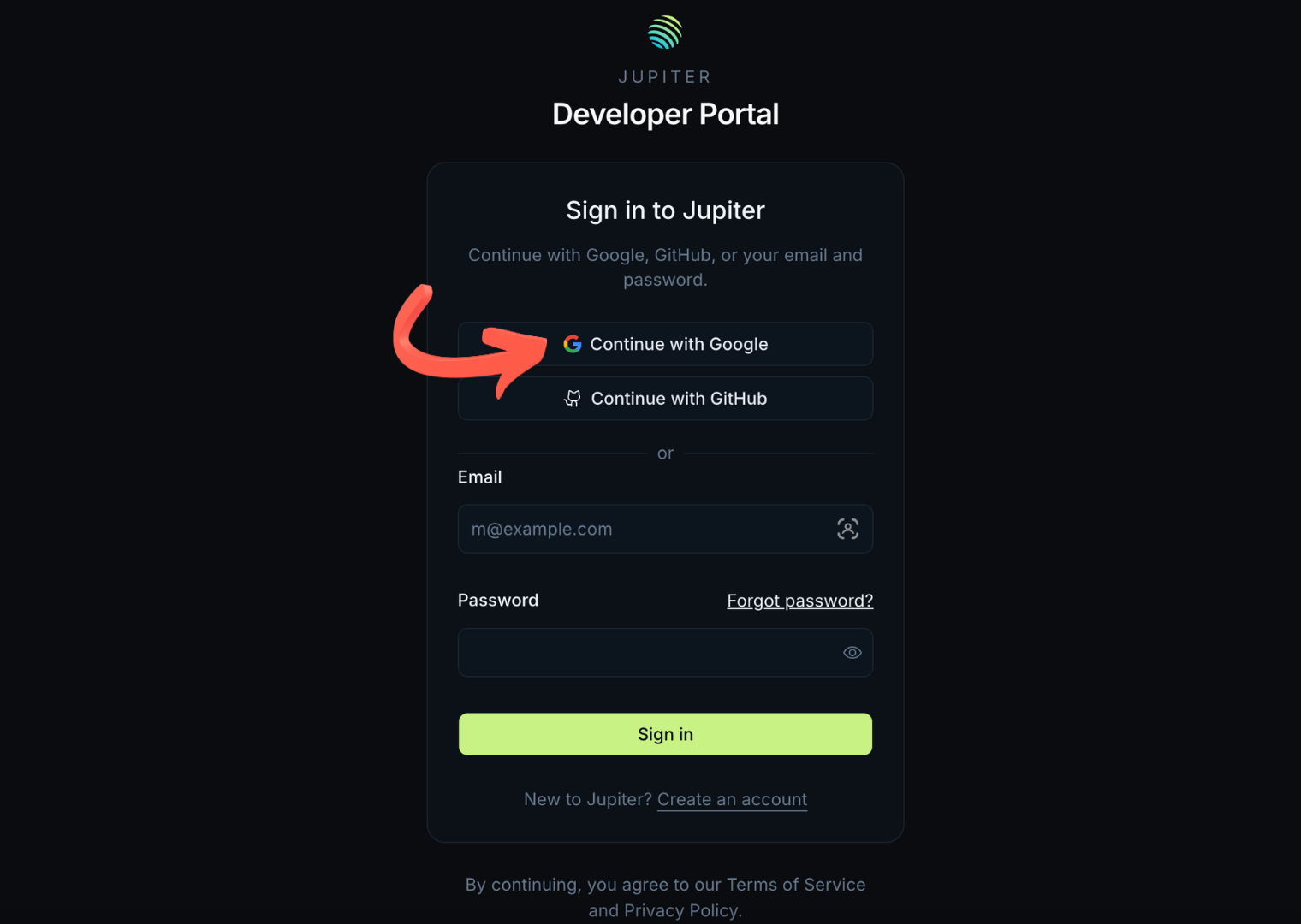
Navigate to Jupiter Portal & Sign In
Visit developers.jup.ag/sign-in ↗. Sign in using your Google account, GitHub, or email.
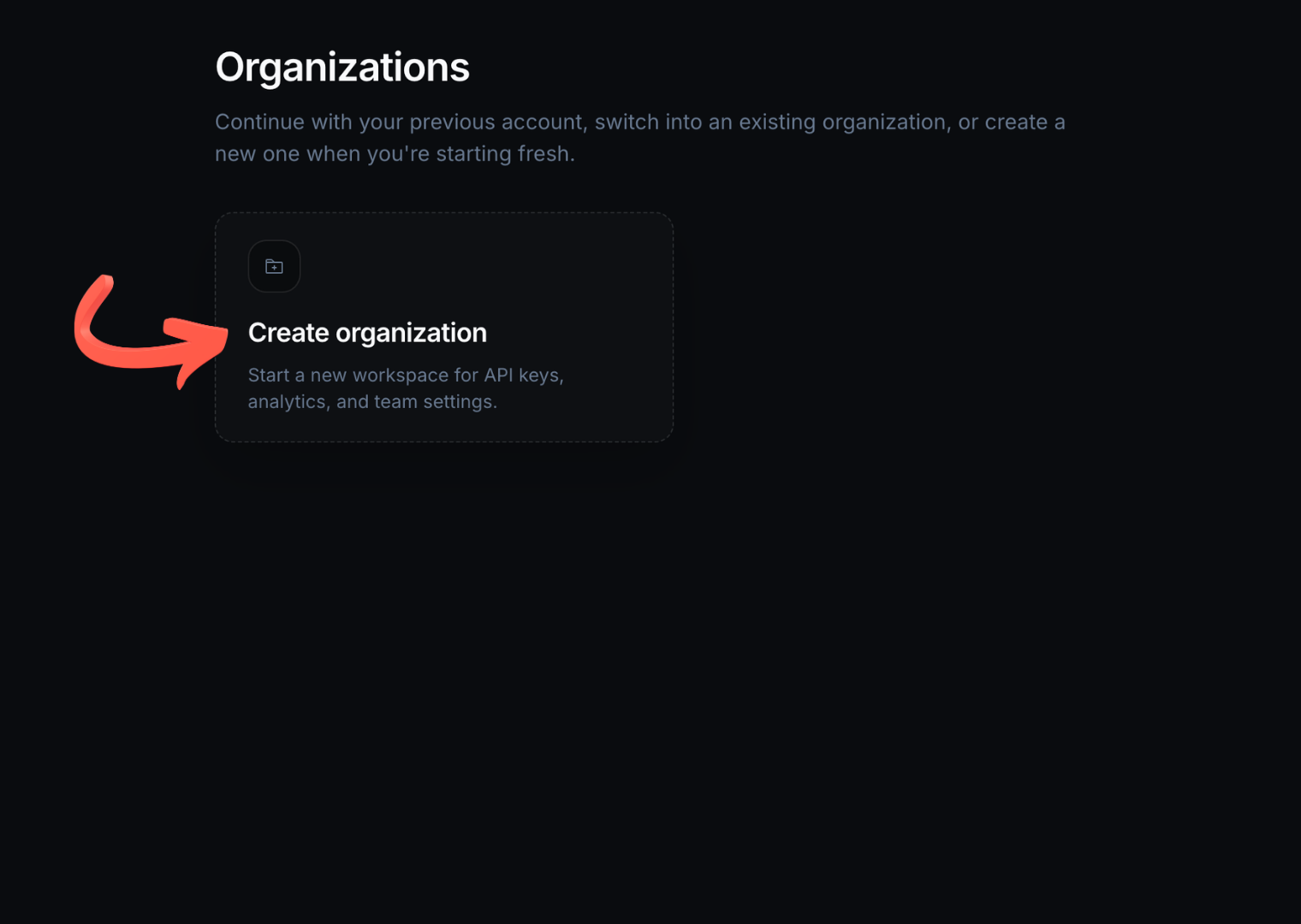
Create an Organization
On the welcome screen, click the Create organization card to initialize your developer workspace for API keys and analytics.
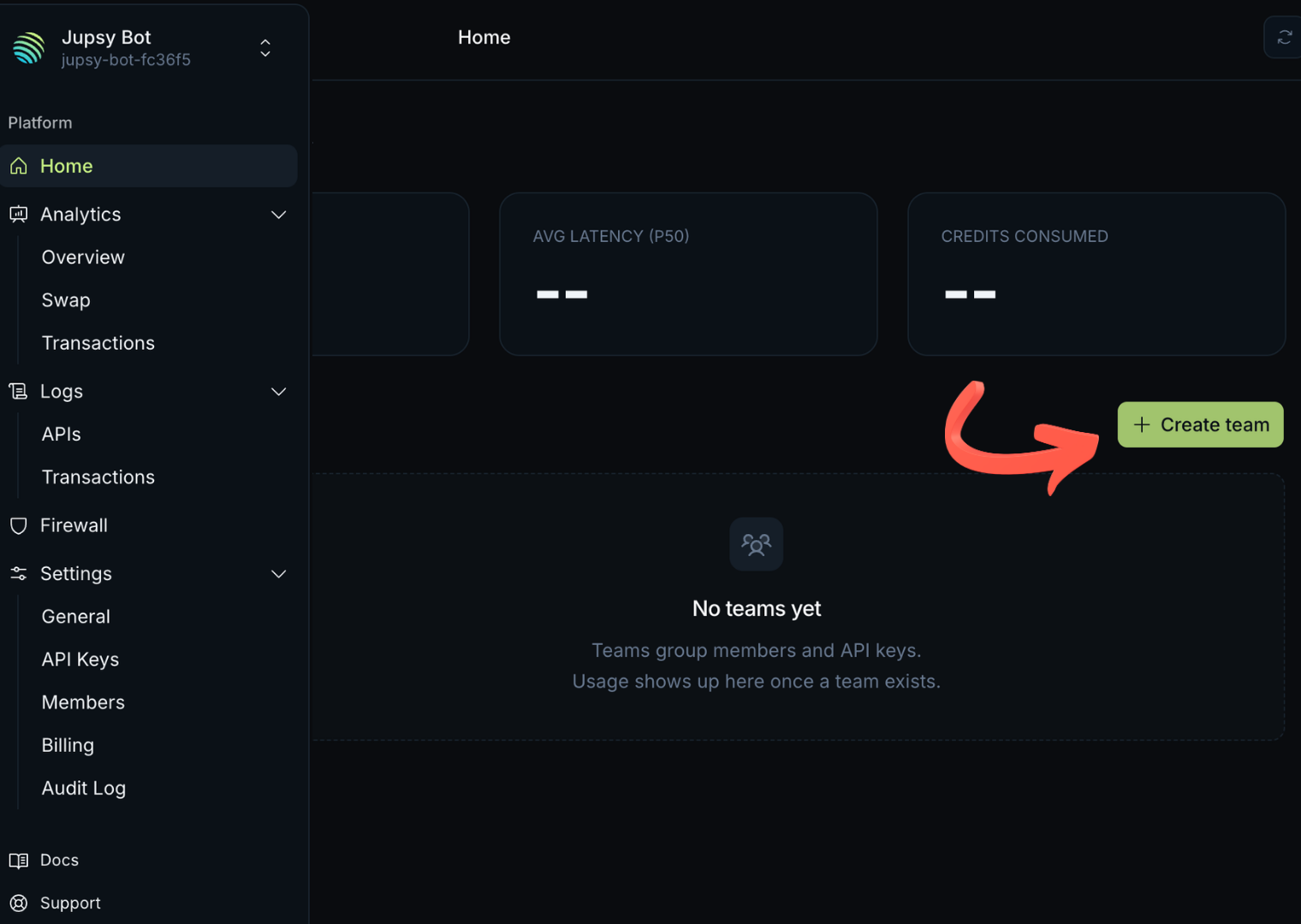
Click "+ Create team"
Once your dashboard loads, locate the + Create team button on the right side of the Home page and click it.
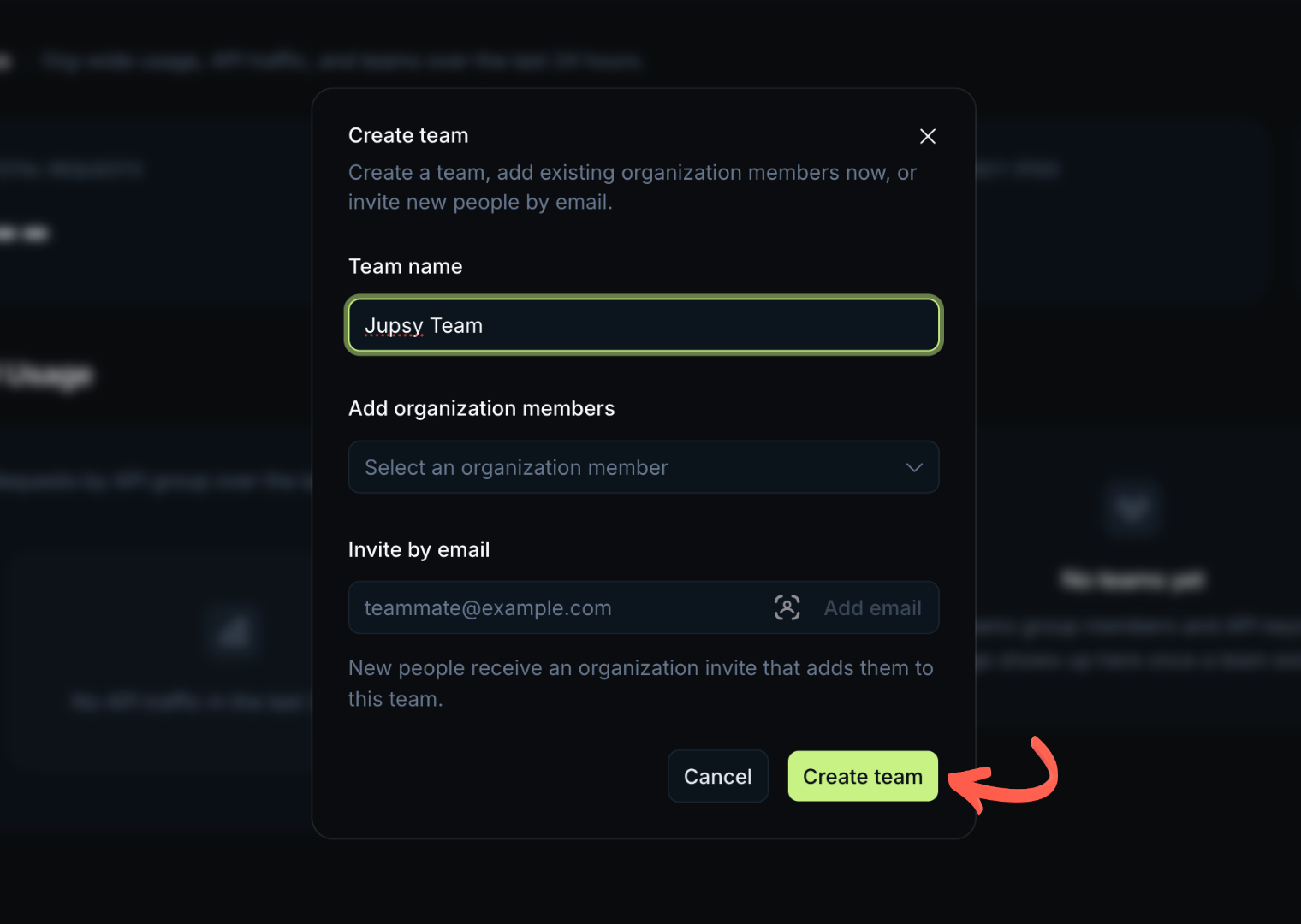
Enter Team Name & Confirm
In the popup modal, enter a team name (e.g. Jupsy Team or your Discord username) and click the green Create team button.
Navigate to Settings ➔ API Keys
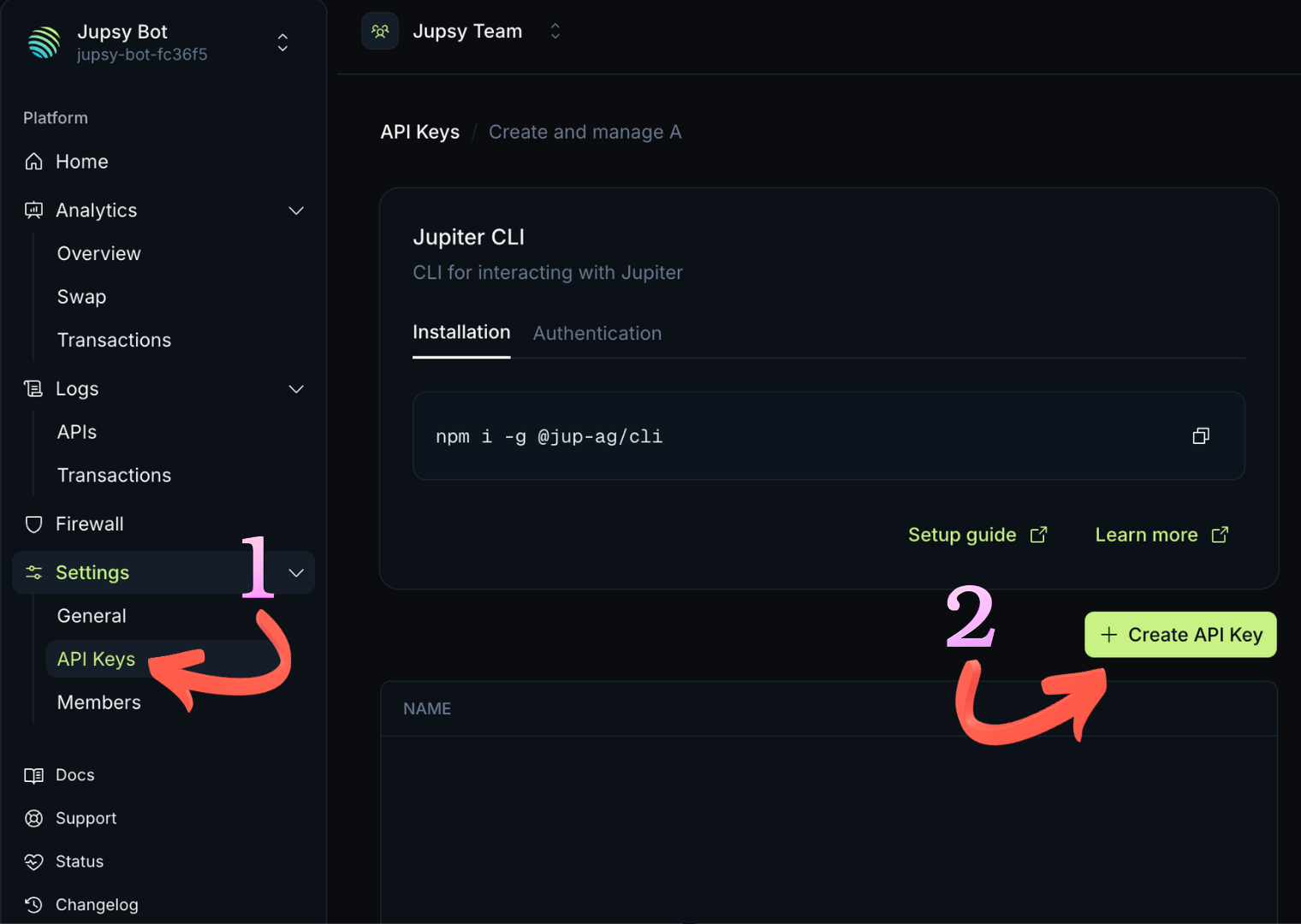
On the left-hand sidebar, open the Settings dropdown, select API Keys, and then click the green + Create API Key button on the right.
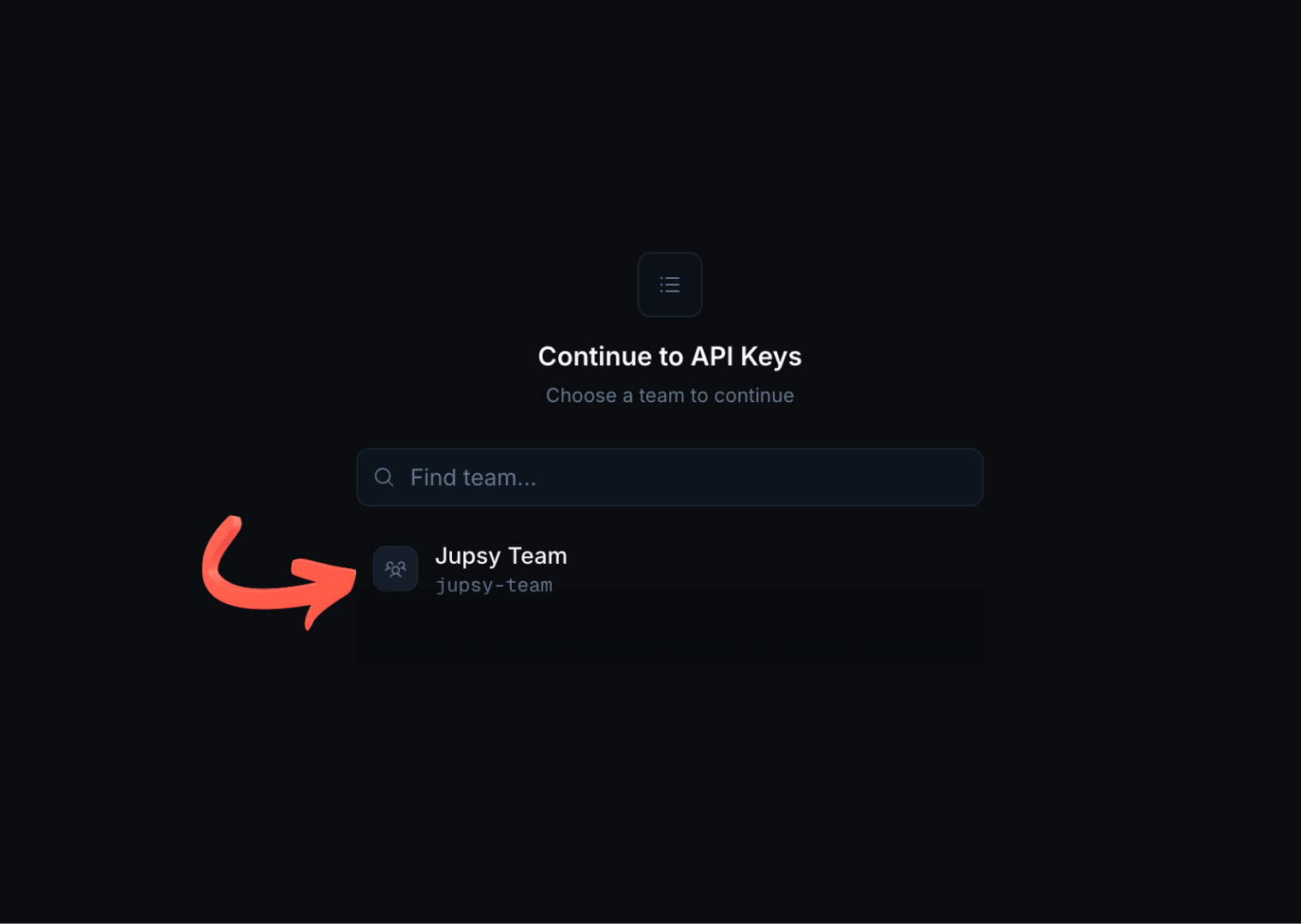
Select Your Team
On the "Continue to API Keys" screen, choose the team you created in Step 4 (e.g. Jupsy Team).
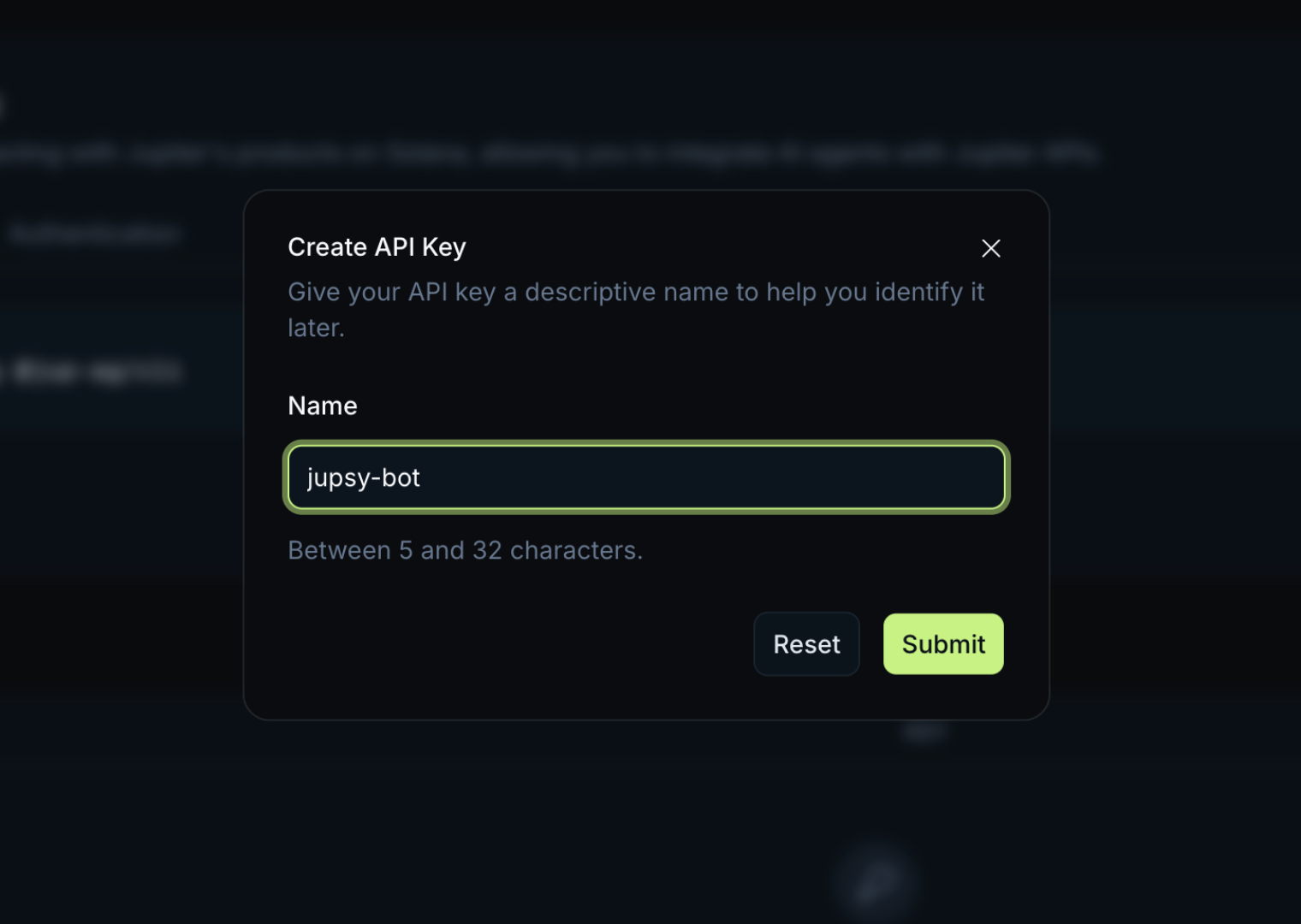
Name Your API Key
Enter a label for your key (e.g. jupsy-bot, must be between 5 and 32 characters) and click Submit.
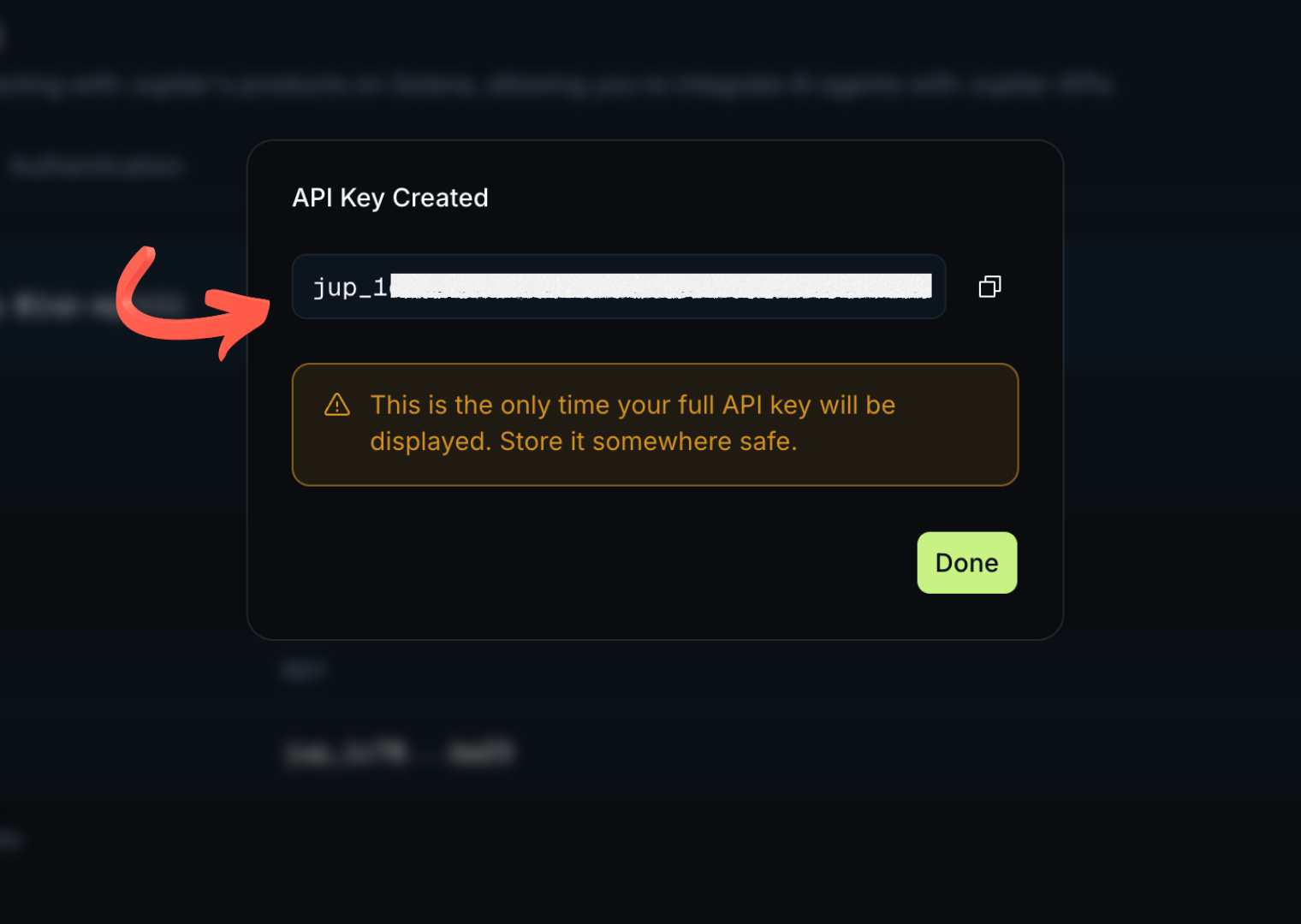
Copy Your Secret Jupiter Key & Save in Bot
Your secret Jupiter API key (starting with jup_) is displayed. Click the copy icon to copy it. Then open Discord, run /setup, and paste it into the Jupiter API Key field.
⚡ How to Get Your Free Helius RPC URL (2 Steps)
Helius provides blazing-fast Solana RPC nodes with priority transaction broadcasting, preventing dropped swaps and network congestion errors. Follow these 2 quick steps to generate your free endpoint.
Sign In to Helius Developer Dashboard
Navigate to dashboard.helius.dev/login ↗. Sign in using your Google account, GitHub, Solana wallet, or email.
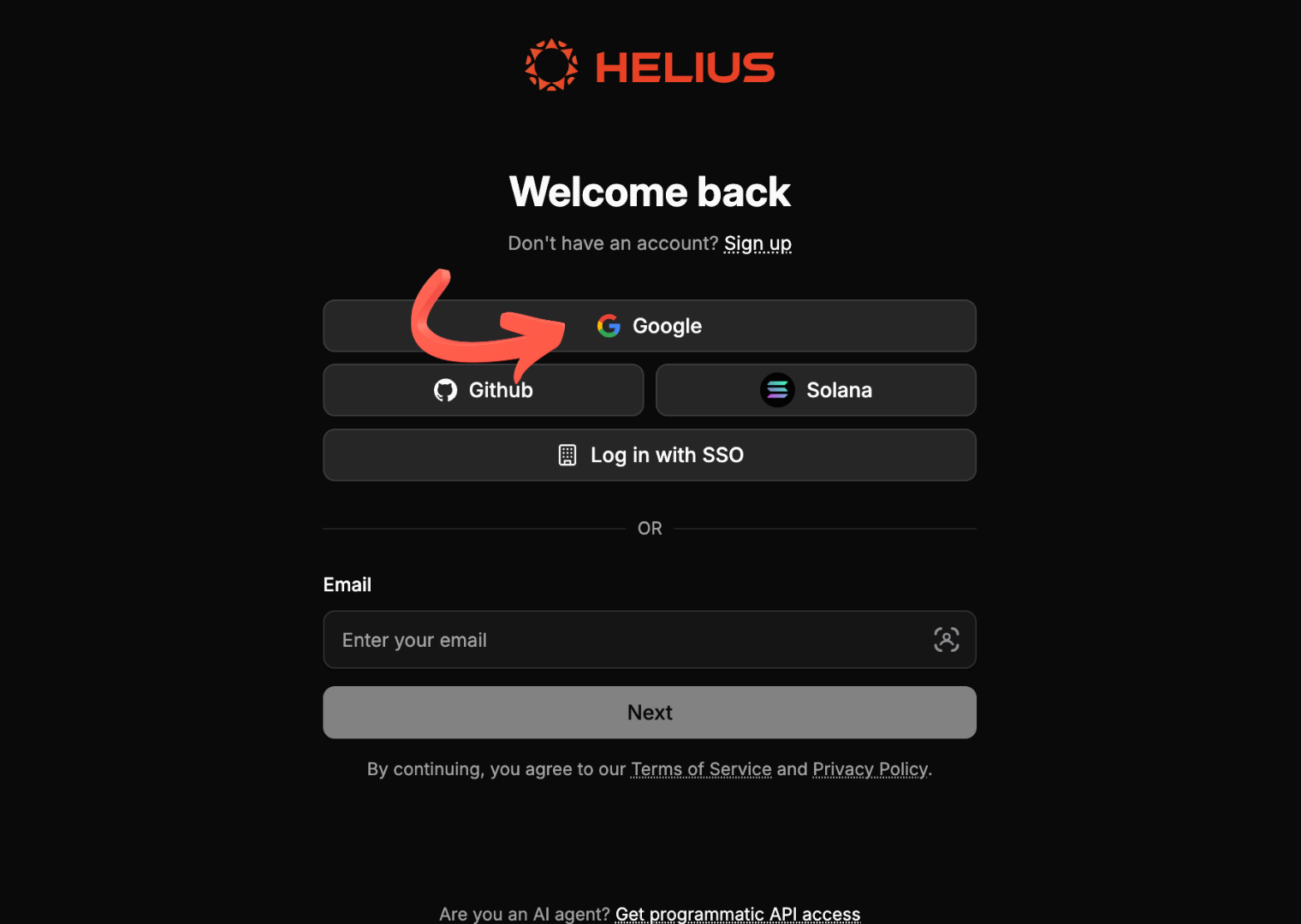
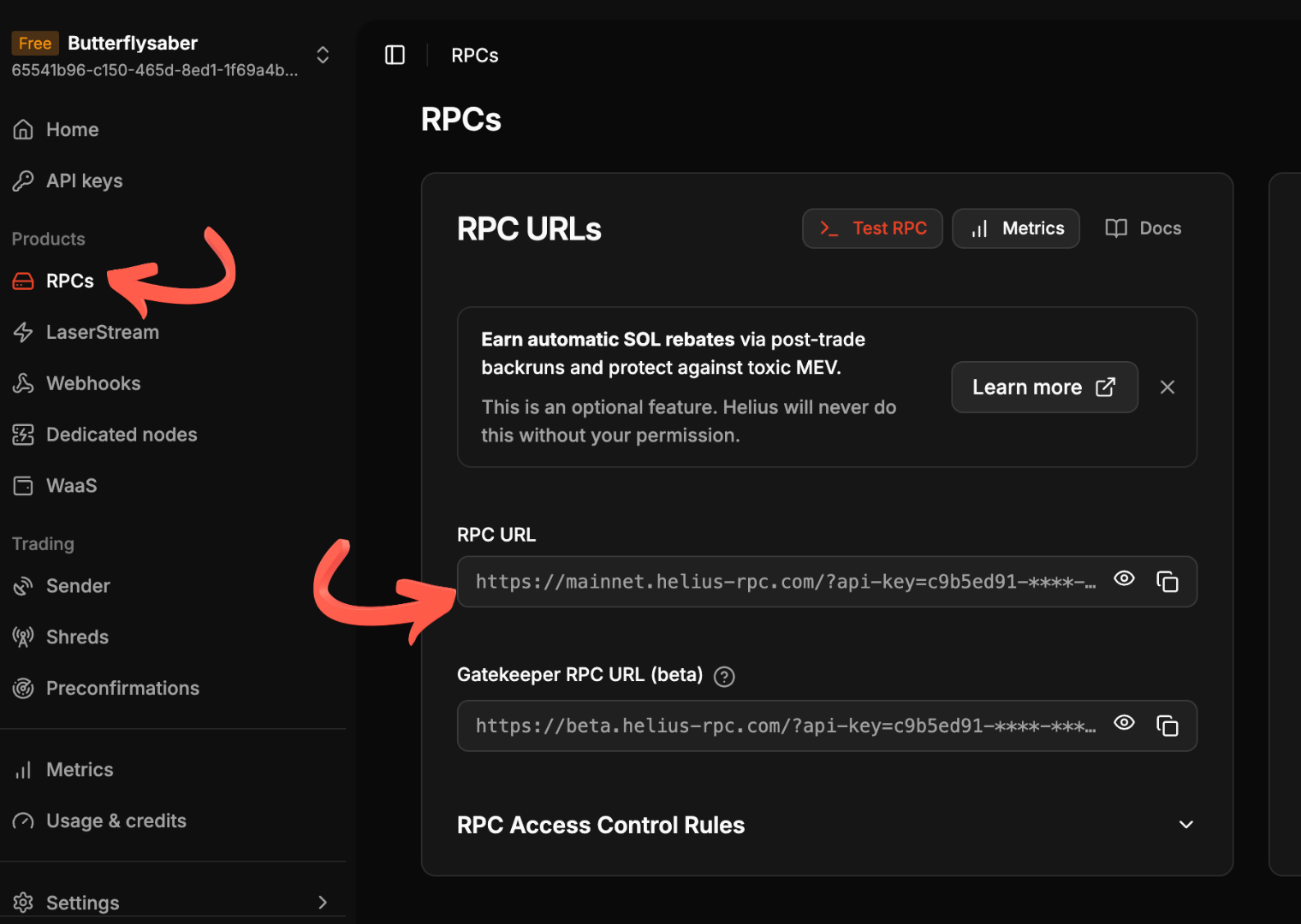
Copy Your Mainnet RPC URL & Add to Jupsy Bot
From the left sidebar under Products, click on RPCs. In the RPC URL field, click the copy icon to copy your full URL (format: https://mainnet.helius-rpc.com/?api-key=YOUR_KEY). Paste this URL into the Helius RPC URL field in Jupsy Bot's /setup modal.
/wallet — The Wallet Console
The /wallet command is your central mission control inside Discord. It displays
your public Solana address, live SOL balance, all non-zero SPL token holdings, and interactive action
buttons.
/wallet
Depositing Funds & Scannable QR Codes
Clicking the 📥 Deposit button in /wallet renders a private
embed containing:
- Your Full Public Key: Ready to copy with 1 click in Discord.
- Live Scannable QR Code: Compatible with Phantom, Solflare, Backpack, and Coinbase Wallet camera scanners.
- Clickable Solscan Link: Direct hyperlink to inspect your wallet address on Solscan.io ↗.
/wallet immediately after sending from Phantom or an exchange to see your updated SOL and
token balances.
Multi-Asset Withdrawals & Security Controls
Clicking the 📤 Withdraw button in /wallet launches an interactive selection menu allowing you to cash out either native Solana (SOL) or $JUPSY Tokens directly to any external Solana wallet address (Phantom, Solflare, Backpack, or hardware wallets).
Interactive Asset Selection Menu
Upon clicking Withdraw, an ephemeral menu displays your live balances with a native Discord Select Menu:
- 🪙 Solana (SOL): Transfer native SOL to your external wallet. Supports fixed numbers, percentages (e.g.
50%), ormax(automatically retains a0.001 SOLnetwork reserve). - 💎 $JUPSY Token: Cash out $JUPSY SPL tokens on-chain with zero platform fees. Automatically initializes the recipient's Associated Token Account (ATA) if needed.
Withdrawal Protection Rules & Reserves
| Asset / Field | Validation Rule | Description |
|---|---|---|
| Recipient Address | Valid Base58 Solana Public Key | Cryptographically validated using Ed25519 format checks (32–44 characters) before broadcast to prevent sending funds to malformed addresses. |
| $JUPSY Minimum Amount | amount >= 10 $JUPSY |
The minimum withdrawal threshold for $JUPSY is 10 $JUPSY tokens. |
| $JUPSY Wallet Reserve | balance - amount >= 1.0 $JUPSY |
Users must always leave at least 1 $JUPSY token in their wallet after withdrawing (minimum wallet balance to initiate is 11 $JUPSY). |
| $JUPSY Smart MAX | max / 100% = balance - 1.0 |
Entering max, all, or 100% automatically calculates and withdraws the maximum allowable amount while leaving exactly 1 $JUPSY reserved. |
| Network Gas Fee Pre-Check | sol_balance >= ~0.002 SOL |
Transferring SPL tokens requires a small amount of SOL in the wallet to pay Solana network fees and idempotent ATA creation for destination wallets. |
| SOL Fee Reserve | balance - amount >= 0.001 SOL |
When cashing out SOL with max, a buffer of 0.001 SOL is automatically retained to pay for the transfer transaction fee. |
| 2-Step Confirmation View | Interactive Approval Screen | Displays asset, amount, destination address, and remaining balance with red Confirm Withdraw and gray Cancel buttons before signing on-chain. |
Buying SPL Tokens with SOL
Buying any token takes seconds. Simply click 🟢 Buy Tokens in your
/wallet:
Specify Token Symbol or Mint Address
Enter any ticker (e.g. BONK, JUP, WIF, PUMP,
USDC) or paste any raw 44-character Solana mint address.
Enter SOL Amount & Slippage Tolerance
Input the amount of SOL to swap (e.g. 0.1) and your slippage percentage (default:
1.0%).
Review In-Place Swap Quote & Confirm
Jupsy Bot fetches the exact Jupiter routing quote and displays estimated output tokens. Click Confirm Swap. The transaction signs, broadcasts via Helius RPC, and confirms with a Solscan transaction hash receipt.
1-Click Quick Buy $JUPSY
The ⚡ Quick Buy $JUPSY button located on the /wallet console
allows users to purchase the native $JUPSY token with a single click, completely bypassing
manual modal typing.
How Quick Buy Works:
- Open your wallet console using
/wallet. - Click the purple ⚡ Quick Buy $JUPSY button.
- Select an amount preset:
0.05 SOL,0.1 SOL,0.25 SOL,0.5 SOL, or1.0 SOL. - Jupsy Bot automatically routes the swap through Jupiter, broadcasts the transaction on Solana, and credits your wallet immediately!
/tip — $JUPSY Token Tipping
/tip user:@Member amount:<int>
Send $JUPSY tokens directly to fellow Discord members with sub-second on-chain settlement, automated recipient wallet generation, and interactive confirmation.
$JUPSY tokens (hMRrRA85NVbUojJTkHhJUoPdWRvGPkyiin9rRc2kory). Use /wallet ➔ ⚡ Quick Buy $JUPSY to acquire tokens to tip!
Key Features & On-Chain Mechanics:
- Auto-Provisioned Recipient Wallets: If the recipient has never used Jupsy Bot before, the bot automatically provisions an encrypted Solana wallet for them on-the-fly.
- Idempotent ATA Creation: The transaction automatically creates the recipient's Associated Token Account (ATA) on-chain if it does not already exist, covered by the sender's network fee.
- Interactive Confirmation View: Renders a preview modal showing the recipient's public address, current balance, and balance after tip before executing.
- Dual Activity History: Automatically logs a
TIP_SENTentry for the sender and aTIP_RECEIVEDentry for the recipient in/logs. - Live Channel Announcements: Broadcasts a tip celebration embed into the server's configured
/logs-channel(respecting server privacy settings). - Permanent $JUPSY Vault Protection:
$JUPSYtoken accounts are permanently exempt from rent reclaiming and can never be closed or burned.
How to Send a Tip:
- Type
/tipin any channel. - Select the
useryou want to tip (e.g.@Friend). - Enter the
amountof $JUPSY tokens to send (e.g.100,500,1000). - Review the confirmation view and click 🎁 Confirm Tip to execute the transfer.
Selling SPL Tokens Back to SOL
Click 🔴 Sell Tokens in your /wallet. You will see an
interactive menu of all SPL tokens currently held in your wallet:
- Select Token: Pick the token you wish to sell from your active holdings.
- Percentage or Fixed Amount: Choose 25%, 50%, 75%, 100% (ALL), or type an exact token quantity.
- Sub-Second Execution: Swaps execute directly against Jupiter DEX pools and return native SOL into your wallet.
1-Click Rent Reclaiming & Fail-Safe Dust Burning
Every time an Associated Token Account (ATA) is created on Solana, approximately 0.002039 SOL (~$0.20 USD) is locked as an on-chain rent-exemption deposit. When you sell tokens, accounts with 0 balance or tiny dust residues remain open on-chain holding your rent.
How to Reclaim Rent:
- Open your wallet console with
/wallet. - Click the 🧹 Claim Rent button located on the same line as your SOL balance.
- Review the detected empty and dust token accounts alongside total reclaimable SOL and live USD valuation.
- Click Claim SOL to broadcast on-chain instructions via your Helius RPC and instantly receive your SOL refund!
4,600+ Tokens DB & Truncated Precision
Jupsy Bot features an automated 24-hour background synchronization engine that populates an in-memory token database of over 4,600+ verified Solana tokens.
Automated Solana Copy Trading Suite
Jupsy Bot's automated copy trading engine allows you to mirror the token purchases and sales of any top trader in your Discord server with institutional-grade safeguards.
Fixed SOL Buy Allocation
Regardless of whether the trader buys with 10 SOL or 100 SOL, your trade executes with your exact configured budget (e.g. 0.05 SOL).
Proportional Auto-Exits
When the trader sells 50% of their bag, Jupsy Bot automatically sells 50% of your bag for that specific token.
Direct Discord DM Receipts
Every mirrored transaction immediately sends you a private DM receipt with Solscan transaction links and execution prices.
/copy-trade follow — Mirroring a Trader
Start mirroring any Discord member in your server with customizable SOL limits and slippage tolerances.
/copy-trade follow user:@trader max_sol_amount:0.05 slippage_pct:1.5
Command Parameters
| Parameter | Type | Default | Description |
|---|---|---|---|
user |
Required Member |
— | The Discord user whose trades you want to mirror. |
max_sol_amount |
Optional Float |
0.1 SOL |
Maximum amount of SOL to spend per copied buy order (min: 0.001 SOL). |
slippage_pct |
Optional Float |
1.5% |
Maximum allowable slippage percentage for mirrored orders (0.1% - 50.0%). |
/setup and executed at least 1 prior test swap in /wallet before
enabling copy trading.
Proportional Exits & Gas Retention
The copy trading engine uses smart proportion calculation to handle multi-step scale-outs:
Example: Proportional Scale-Out Workflow
- Buy Signal:
@Traderbuys 1,000,000 $BONK with 5 SOL. Follower buys 10,000 $BONK with their configured0.05 SOLlimit. - Partial Take-Profit:
@Tradersells 500,000 $BONK (50% of their bag). Jupsy Bot automatically calculates the 50% ratio and sells 5,000 $BONK (50% of follower's bag) into SOL. - Final Exit:
@Tradersells their remaining $BONK. Follower's remaining balance is sold automatically.
Managing Targets: List, Pause & Resume
You can manage your active copy trading targets at any time with dedicated commands:
/copy-trade list
Displays all traders you are currently copying, their active/paused status, total copied trades, and total SOL allocated.
/copy-trade pause user:@trader
Temporarily pauses mirroring a trader without losing your custom SOL allocation and slippage settings.
/copy-trade resume user:@trader
Re-activates mirrored trading for a previously paused target.
/copy-trade unfollow user:@trader
Completely removes a trader from your copy trading list.
/copy-trade leaderboard — Server Rankings
Discover top traders in your Discord server ranked by Net Realized Profit (SOL), Win Rate %, and Total Trade Volume.
/copy-trade leaderboard
1-Click Copy Trading via /pnl
When inspecting any trader via /pnl user:@trader, Jupsy Bot automatically
renders a 👥 Copy Trade @Trader button at the bottom of their profile embed. Clicking this
button opens a modal allowing you to configure your budget and start copying with zero typing required.
/pnl — Portfolio Analytics
The /pnl command calculates your comprehensive trading performance across all
Solana swaps executed with Jupsy Bot.
/pnl
Metrics Calculated
| Metric | Formula / Details |
|---|---|
| Net Realized PnL | Total SOL Received from Sells - Cost Basis of Sold Tokens (calculated strictly on tokens bought and sold via Jupsy Bot; external deposits excluded) |
| Realized ROI % | (Net Realized PnL / Cost Basis of Sold Tokens) * 100 |
| Win Rate % | (Profitable Closed Trades / Total Closed Tracked Trades) * 100 |
| Total Trade Volume | Aggregate SOL volume across completed Jupsy Bot buy and sell transactions. |
Inspecting Other Traders (/pnl user)
Audit the verified track record of any server member before deciding to mirror their trades.
/pnl user:@trader
Token Breakdown Analysis (/pnl token)
Inspect your historical profit and loss on an individual token basis (e.g. BONK, JUP, WIF).
/pnl token:BONK
/logs — Transaction Audit History
Jupsy Bot logs every transaction in the database and formats your 20 most recent entries with
dynamic local Discord timestamps (<t:timestamp:f>) and Solscan verification links.
/logs
Log Categories & Solscan Links
Activity logs are categorized cleanly into four main action types:
| Category | Action Trigger | Solscan Hyperlink Included |
|---|---|---|
BUY |
Token purchase via /wallet or automated copy trade. |
✅ Yes (Transaction Signature) |
SELL |
Token sale via /wallet or automated copy trade. |
✅ Yes (Transaction Signature) |
WITHDRAWAL |
SOL or SPL token transfer to external address. | ✅ Yes (Transaction Signature) |
COPY_TRADE |
Follow, unfollow, pause, or resume action. | — |
WALLET_CHECK) are logged
silently in the database for security compliance but are filtered out from the Discord /logs
embed so your transaction feed stays clean and readable.
Airdrop Points Reward Engine
Jupsy Bot features an automated trading reward system where users accumulate Airdrop Points on every buy and sell swap. Points directly determine whitelist qualification for our upcoming Free Mint Genesis NFTs and distribution of the 100% Dev Supply Airdrop.
/wallet console (e.g. -# Airdrop Points: 1,250 | Buy/Sell Tokens to earn) and
announced with every trade in live server notifications.
Point Reward Mechanics
| Trade Type / Token | Points Awarded | Notes |
|---|---|---|
| Standard Token Buy (All Tokens) | +10 Points |
Base points awarded automatically on every completed buy swap. |
| Standard Token Sell (All Tokens) | +10 Points |
Base points awarded automatically on every completed sell swap. |
| $JUPSY Token Trades (Buy or Sell) | +50 Points |
5x Boost Multiplier! Trading $JUPSY awards 50 points per trade. |
/airdrop-config view — Reward Dashboard
Any user can run /airdrop-config view in Discord to inspect active airdrop
reward tiers, default point values, and special token multipliers.
/airdrop-config view
Bot Owner Management
/airdrop-config set <token> <buy_points> <sell_points>: Configures custom point multipliers for any token ticker, mint address, orDEFAULT./airdrop-config remove <token>: Removes a custom token boost, immediately reverting the token back to default point rewards./airdrop-config view: Public command for all members to view active reward rules.
/leaderboard — Airdrop Points Rankings
View live trader rankings ranked by accumulated Airdrop Points with completed trade counts. Displays the top 10 traders per page with optional page navigation and Global vs Server scope switching.
/leaderboard [page:1..N] [scope:global/server] [user:@User]
Command Parameters
| Parameter | Type | Default | Description |
|---|---|---|---|
page |
Integer (≥ 1) | 1 |
Fetch specific page of rankings (10 traders displayed per page). |
scope |
Choice | 🌐 Global |
Toggle between all bot users across Discord or members within your current server. |
user |
Member / User | Optional | Optional member to highlight in the rankings. |
/logs-channel — Real-Time Server Trade Feeds
Server Administrators can set up a dedicated Discord channel to broadcast live trade notifications whenever members buy, sell tokens, reclaim rent, or cash out SOL using Jupsy Bot.
/logs-channel add channel:#trade-alerts [private:True/False]
Administrator Subcommands
/logs-channel add channel:<#channel> [private:True/False]: Assigns the designated logging channel. Optionalprivatetoggle controls anonymity./logs-channel remove: Disables live trade logging in the server./logs-channel view: Displays the current notifications channel and privacy configuration.
- Public Mode (
private:False): Tags the trader (e.g.@username just bought 150 $JUPSY). - Private Mode (
private:True): Masks identity completely (e.g.Someone just bought 150 $JUPSY). - Zero TX Hash Leaks: For maximum trader safety, transaction signatures/hashes are
never published to server channels. All tokens are hyperlinked safely to Jupiter
(
https://jup.ag/tokens/{mint}).
Standardized Help Guides
Jupsy Bot provides clean, spam-free help menus tailored to regular traders and server administrators:
User Command Guide: /help
/help
Displays a clean, private overview of all trader tools (/wallet,
/pnl, /copytrade, /logs, /setup,
/airdrop-config view).
Server Admin Guide: /admin-help
/admin-help
Restricted to members with Server Administrator permissions. Explains all
/logs-channel trade notification controls.
Genesis NFT Pass & $JUPSY Token Utility
Holding $JUPSY tokens and Genesis NFTs unlocks priority execution across all features, 0% withdrawal fees with $JUPSY, a 100% dev supply airdrop after the locking period, and server licensing rights.
Top Priority Across Everything
Holders of $JUPSY tokens and Genesis NFTs receive top-tier priority across all bot features, faster execution routing, early access tools, and dedicated support.
0% Fees on $JUPSY Withdrawals
Zero platform fees on all withdrawals processed using the native $JUPSY token.
100% Dev Supply Airdrop
100% of the developer token supply will be airdropped directly to $JUPSY and Genesis NFT holders after the locking period.
0% Swap Fees & Server Whitelisting
Zero platform surcharges across token swaps and permission to authorize Jupsy Bot inside your own Discord communities.
hMRrRA85NVbUojJTkHhJUoPdWRvGPkyiin9rRc2kory
Fee Structure Comparison
| Tier | Swap Platform Fee | Copy Trading Engine | Server Whitelisting |
|---|---|---|---|
| Public Free Tier | 0.5% | Standard Speed | Public Servers Only |
| $JUPSY & Genesis NFT Holder | 0.0% (Zero Fees) | Top Priority Execution | Unlimited Servers |
RPC & Swap Error Resolution
Jupsy Bot translates low-level Solana RPC errors into friendly, actionable diagnostic messages.
| Error Type | Root Cause | How to Resolve |
|---|---|---|
AccountNotFound |
Wallet has 0 SOL or recipient token account does not exist. | Deposit a small amount of SOL (e.g. 0.01 SOL) into your Jupsy wallet address. |
BlockhashNotFound |
Transaction expired during Solana cluster congestion. | Retry the swap. Ensure your Helius RPC URL in /setup is configured. |
SlippageExceeded |
Price moved beyond your maximum slippage tolerance. | Increase slippage percentage (e.g. from 1.0% to 2.5%) during high volatility. |
InsufficientBalance |
Attempting to swap or withdraw more SOL than available after reserving gas. | Leave at least 0.005 SOL in your wallet to cover network transaction fees. |
Managing Slippage in Fast-Moving Markets
When trading newly launched meme tokens or during major market volatility, prices can shift
within milliseconds. If your swap fails with SlippageExceeded:
- Type a higher slippage tolerance (e.g.
2.0%or3.0%). - Verify your Helius RPC URL in
/setupto take advantage of priority fee routing.
Insufficient SOL Balance & Gas Diagnostics
Solana transactions require a small amount of SOL for compute fees, network prioritization, and Associated Token Account (ATA) rent. If your wallet lacks sufficient funds for a trade, Jupsy Bot automatically displays a clear breakdown comparing your available balance with the required amount:
"❌ Insufficient SOL Balance: Your wallet currently has
0.0060 SOL, but this transaction
requires 0.0500 SOL (including network & rent fees)."
How to Resolve Insufficient Balance:
- Run
/walletin Discord. - Click 📥 Deposit to view your Solana deposit address and QR code.
- Send a small amount of SOL (e.g. 0.05 SOL or higher) from your external wallet (Phantom, Solflare, etc.).
- Once deposited, re-run your swap or Quick Buy!
Safety Gas Buffer:
Jupsy Bot automatically enforces a 0.005 SOL safety reserve on all withdrawals and automated copy trades to guarantee your wallet always has enough gas to execute future transactions.
Cryptographic Specifications
Technical implementation details for security auditors and developers:
- Encryption Algorithm: Fernet Symmetric Key Cryptography (AES-128-CBC + HMAC-SHA256 authenticated envelope).
- Key Derivation: 256-bit cryptographically secure pseudorandom secret derived from environment configuration.
- Transaction Construction:
solders.transaction.VersionedTransactionwithMessageV0compiled instructions. - Auditability: Every trade hash and token mint is hyperlinked to official Solscan verification endpoints.
Frequently Asked Questions
No. Your private keys are encrypted with AES-256 and stored in the database. Transactions can only be initiated through your personal Discord user account interactions.
You can withdraw your entire SOL and token balances to your Phantom or Solflare wallet at any time
with 0 platform fees using the /wallet Withdraw modal.
Jupsy Bot checks token mints against Jupiter's verified routing engine and enforces your
max_sol_amount budget limit on every single buy order, capping your maximum downside per
trade.